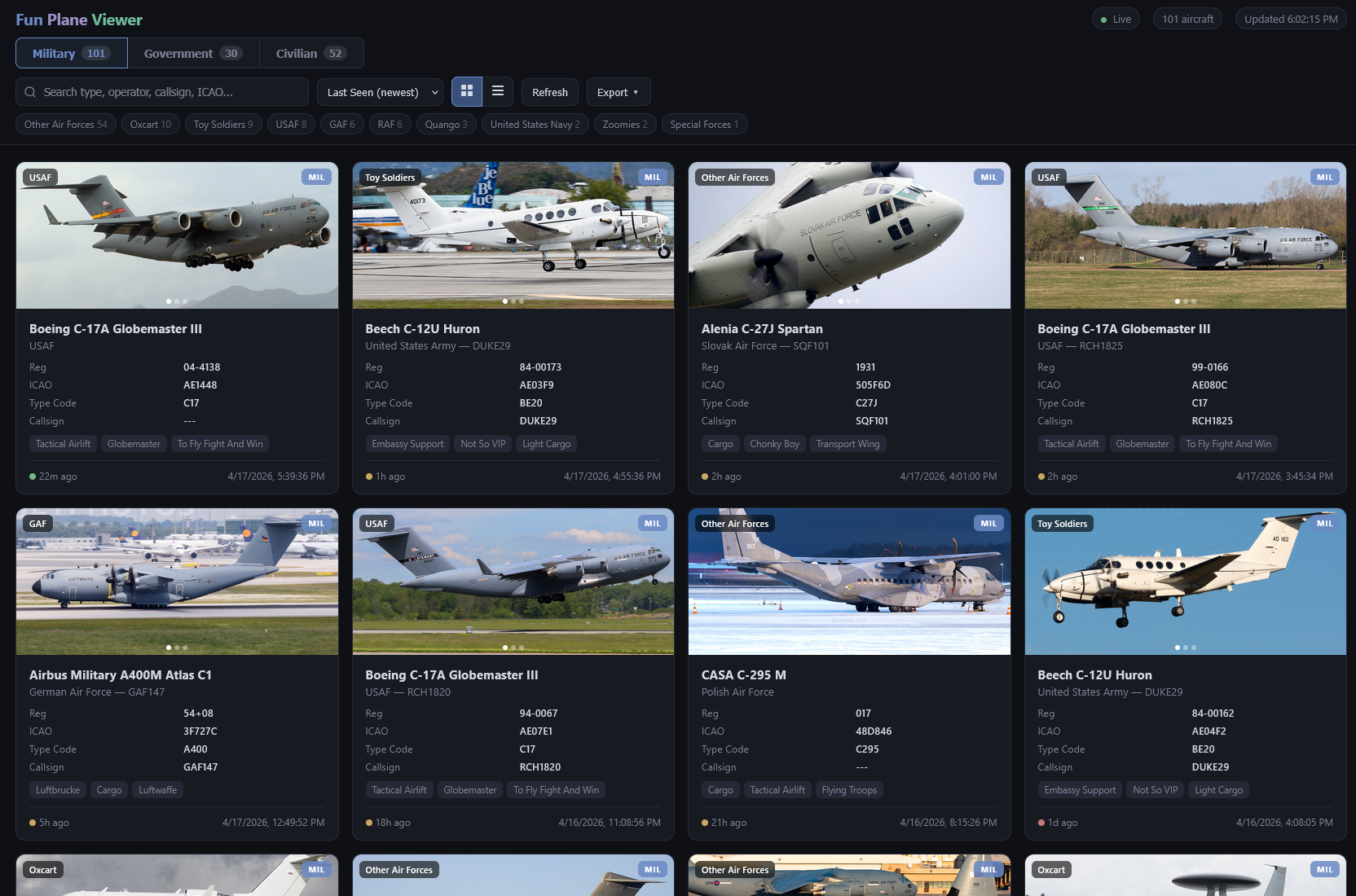
Better GUI for showing all planes caught and logged on SkyStats from your ADS-B feeder.
I run an ADS-B feeder using adsb.im with SkyStats enabled. SkyStats uses the plane-alert-db to log interesting aircraft spotted by your feeder, but its built-in GUI is designed around showing just a handful of recent planes. It can technically display more, but it lacks the filtering and layout to make that practical.
This project is a vibecoded fix meant for my personal use. It uses the same SkyStats backend as the official GUI, but presents the full history in a much more readable way.
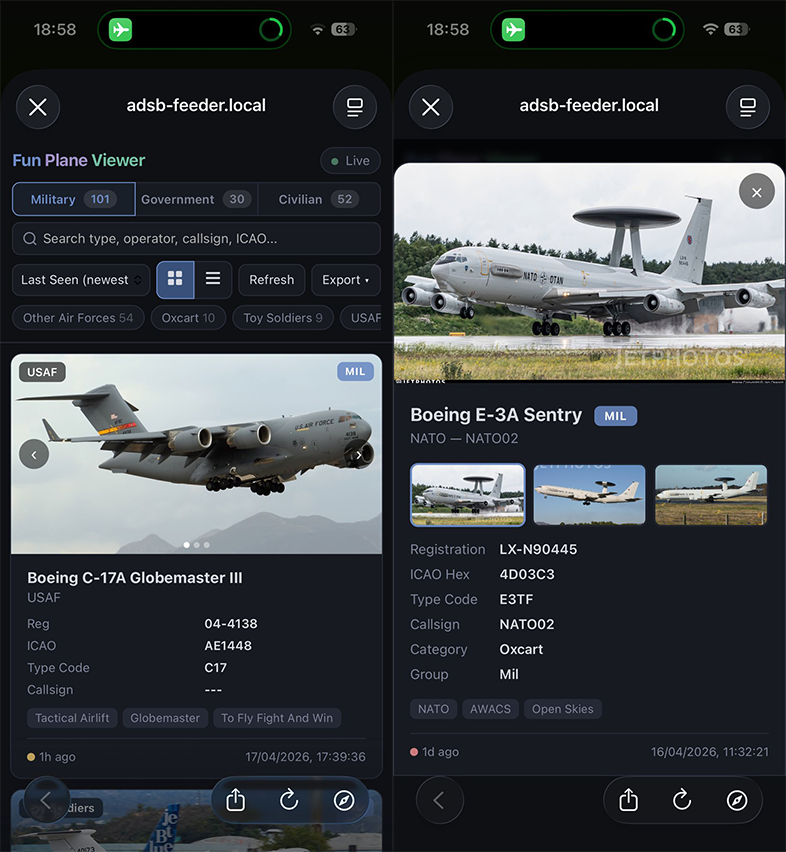
It's also optimised for mobile since that was my main priority.
Browsing
- Military, government, and civilian tabs backed by the SkyStats interesting-aircraft endpoints.
- Grid and table views for stepping through a large aircraft history.
- Search across type, operator, callsign, ICAO, registration, category, and tags.
- Sort by last seen, type, operator, or category.
- Category filter chips with live counts.
- Aircraft detail modal with image gallery, tags, metadata, and last-seen time.
- Image fallback cards for aircraft without photos.
- 24-hour time formatting.
- Mobile-friendly layout with a collapsing header.
Stats dashboard
- A Stats tab with a switch between two views: "Backend stats" (feeder-wide) and "My aircraft" (your logged interesting aircraft).
- Backend stats come from the SkyStats
/api/statsendpoints:- Totals for unique aircraft seen and flights tracked.
- Top aircraft types, with toggles for metric (flights flown or unique aircraft) and timeframe (24h, month, year, all).
- Top airlines, busiest routes, top domestic and international airports, and origin and destination countries.
- My aircraft stats are computed in the browser from the logged mil/gov/civ lists:
- Activity summary: aircraft logged, new in the last 24h, busiest hour and day, and the last-seen date range.
- Breakdown by group (military, government, civilian).
- Seen by hour of day and by day of week (based on each aircraft's last-seen time).
- Top operators, types, tags, and categories.
- Dependency-free CSS bar charts that pack neatly and stay readable on mobile.
Import and export
- CSV export for the current filtered list, with an "include tags" toggle.
- CSV and JSON import for restoring backups.
- Imported backups are merged into the live receiver feed instead of replacing it.
- Imported backup data persists locally in the browser, with optional shared persistence on the Pi (see server/README.md).
- Optional import enrichment from plane-alert-db:
- pulls missing image links from
plane_images.csv - pulls missing tags and metadata from
plane-alert-db.csv
- pulls missing image links from
- In-app import prompts instead of browser popups.
Hidden menu (triple-click the title)
- Add manual per-aircraft image links, saved either locally or on the Pi for everyone.
- One-click JetPhotos lookup by registration, plus Google and Planespotters lookups by ICAO hex.
- Optional Tailscale-friendly backend URL override for accessing the GUI from outside the local network.
- Optional "Update from GitHub" button that pulls the latest
index.htmlfrommainand reloads, so you don't need to ssh in to deploy a change (requires the Flask sidecar, see server/README.md).
The SkyStats backend defaults to returning only 5 planes, so you need to raise that limit before this GUI is useful. Pick one of the two options below.
- Install dependencies:
pip install requests colorama - Run
patch.py - Enter your feeder URL when prompted (default
adsb-feeder.local:5173) - Enter the limit you want to set (default
9999) - If the request succeeds, you're done.
-
Open SkyStats and go to Settings.
-
Open your browser's network tab (F12 then Network).
-
Change "Interesting Aircraft - Number of rows to display" to any value (the exact number doesn't matter).
-
Find the request that was triggered, right-click it, and copy as cURL.
-
Paste it into an API client like Postman.
-
In the request body, set
interesting_table_limitto a large number like99999. The full body should look like:{"route_table_limit":"5","interesting_table_limit":"99999","record_holder_table_limit":"5","disable_planealertdb_tags":"false"} -
Send the request. If it succeeds, you're done.
By default the GUI talks to the SkyStats backend at the same hostname the page was loaded from, on port 5173. If you open the GUI via your feeder's Tailscale hostname or tailnet IP, the API calls automatically go over Tailscale too, as long as port 5173 is reachable on that host.
If your setup needs a different backend address (for example, the GUI is hosted on a different machine than the feeder, or you're proxying SkyStats through Tailscale Serve), open the hidden menu (triple-click the title), click Change backend URL… at the bottom, and enter the full URL, for example:
http://my-feeder.tailnet-name.ts.net:5173https://feeder.tailnet-name.ts.net
The value is stored in your browser's local storage and used for all subsequent requests. Click Reset to default to go back to the automatic behavior.
If the GUI loads but the aircraft list doesn't, the error message includes a Change backend URL button that opens the same dialog.
Note: if you access the GUI over HTTPS (for example via Tailscale Serve with TLS), the backend URL also needs to be HTTPS. Browsers block mixed HTTP/HTTPS requests.
A small Flask sidecar adds shared server-side persistence for manual image links and imported backups, plus a self-update button in the hidden menu that pulls the latest index.html from GitHub. It's strictly optional; without it the GUI works exactly as before.
See server/README.md for setup.